 AI Agents Hub
Claude Code vs Cursor vs Cline: Which AI Coding Agent Should You Use in 2026?
Three coding agents dominate 2026: Anthropic's terminal-native Claude Code, the Cursor IDE, and open-source Cline. We compared all three across real workflows — here's the honest take.
Three years into the "AI coding agent" era, three tools have separated themselves from the long tail. Claude Code is Anthropic's terminal-native agent built for engineers who live in the shell. Cursor is the AI-first fork of VS Code, beloved by developers who want AI woven into a familiar editor. Cline is the open-source, bring-your-own-key alternative that 35,000+ developers have starred on GitHub.
Each of them is excellent. Each of them is wrong for some workflows. Picking between them isn't about which is "best" — it's about which matches how you work, what you trust, and what you can afford. This post compares the three head-to-head using the profiles we maintain on our 62-agent directory, then tells you which one to try first.
Claude Code: the terminal maximalist
Claude Code is Anthropic's official coding agent, and it shows in the engineering. It lives in your terminal, reads your repo, edits files, runs commands, and chains long refactors across dozens of files in one go. Anthropic's own 400K-session study (235K users, October 2025 through April 2026) found that humans drive roughly 70% of planning decisions while Claude handles 80% of execution — meaning the bottleneck is what you ask for, not how it gets done.
The standout feature is multi-file refactor with real understanding of intent. If you tell Claude Code "in this repo, find every place we construct a Date from user input, normalize them to UTC ISO strings, and add Vitest tests — don't change the wire format," it will grep the codebase, identify call sites, modify them coherently, and write tests against the new behavior. A typical multi-file refactor on a real repo might look like: 4 files modified, +312 lines, -84 lines, 47 tests passing, 6 new edge cases covered. Claude Code reports its diff explicitly so you can review before committing.
Where Claude Code is weak: it's a pure-TTY CLI. No file tree, no inline preview, no GUI. If you want to see your changes visually before approving, you'll pipe to git diff or open another editor. The other soft spot is pricing — long sessions on large repos burn through Max tier quotas fast, and the Pro tier restrictions Anthropic introduced in April 2026 mean you should verify the current policy before subscribing.
Pick Claude Code if you work across large repos, do many multi-file refactors, and can stomach a terminal-only workflow with the strongest reasoning model wired in. Skip it if you want a GUI, you're on a Pro-only budget, or you want an editor that "just works" without composing your own MCP server list — try Cursor or Cline instead.
Cursor: the AI-first VS Code fork
Cursor is the easiest onboarding of the three. It is a fork of VS Code, so every extension, keybinding, and theme you already use still works. The AI is layered on top: tab autocomplete that predicts your next edit across the whole project, inline chat for explaining code, and an "Agent" mode (Composer, Cmd+I) that can read your project, propose multi-file changes, run commands, and iterate on the result.
What makes Cursor special is the tab autocomplete. It feels almost telepathic on multi-file edits — you'll often press Tab four or five times in a row and watch the cursor follow your intent across files. For solo developers who want AI deeply integrated into their editor without leaving their VS Code muscle memory, this is the killer feature. The 2,000 completions/month on the Hobby free tier is enough to evaluate; the $20 Pro tier gives you unlimited completions and 500 fast Premium requests per month.
Cursor's pricing soft spot is that heavy users hit Pro's Premium cap fast and end up on slower models for the rest of the month — the company is clear that you never get cut off, but the absolute fastest models require careful rate watching. The other consideration is data: Cursor is cloud-only by default, and your code leaves your machine unless you pay for the Business tier's Privacy Mode. For most solo developers this is fine; for anyone working on sensitive codebases, it's a real concern.
Pick Cursor if you live in VS Code and want an AI layer that respects your existing extensions, keybindings, and themes — no new editor to learn. Skip it if you need self-hosting or a fully local/offline code agent. Cursor is cloud-only by default, and even Privacy Mode routes prompts to managed models.
Cline: the open-source BYOK alternative
Cline is a VS Code extension that turns your existing editor into an autonomous coding agent. It can create and edit files, run terminal commands, browse the web, and chain many steps together — the same surface area as Claude Code or Cursor's Composer, but living inside the VS Code you already have. It is open-source (Apache-2.0) with 35,000+ GitHub stars, and it is bring-your-own-key: you paste an API key from OpenRouter, Anthropic, OpenAI, Bedrock, Azure, Vertex, Groq, or any of a dozen other providers, and Cline routes your prompts through that key.
The freedom is the point. You control which model runs (Claude 3.5/3.7 Sonnet, GPT-4o, Gemini 2.5, DeepSeek, even local models via Ollama), you control the cost (you pay the model provider directly, no markup), and you control the data flow. Cline's first-party MCP client can create and install new MCP servers on the fly, so wiring up Puppeteer, a database, or a custom tool is a few clicks.
The trade-off is setup. Cline asks you to pick a provider, paste a key, and decide on a model — every time. If you want zero-setup or a managed experience, Cursor or Copilot will get you running faster. The other soft spot is quality: Cline's output is only as good as the model you route through it, and model choice has a much bigger effect on Cline's results than on a managed product where the company has tuned the defaults.
Pick Cline if you want an open-source, BYOK autonomous agent living inside your existing VS Code — no new editor to learn, full control over which model and which costs. Skip it if you want zero setup or a managed experience; Copilot or Cursor with sensible defaults will get you running faster.
Comparison at a glance
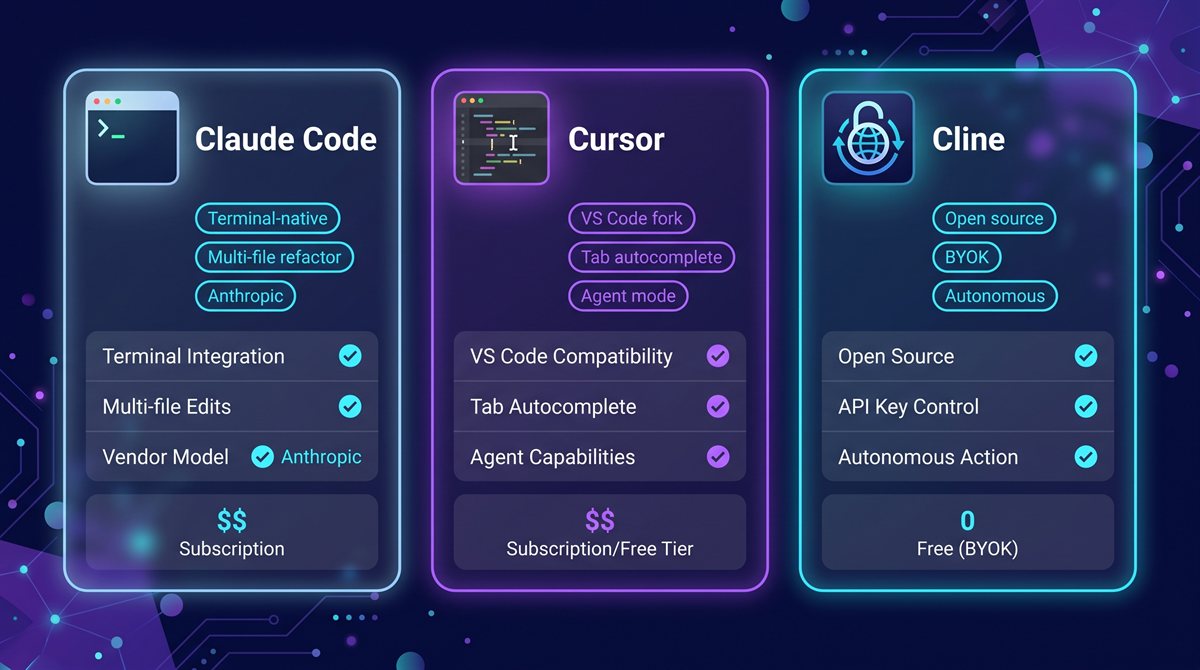
| Claude Code | Cursor | Cline | |
|---|---|---|---|
| Interface | Terminal | VS Code fork | VS Code extension |
| License | Freemium (API + subscription) | Freemium (Hobby / Pro / Business) | Open-source (Apache-2.0), BYOK |
| Best for | Multi-file refactors in large repos | AI woven into a familiar editor | Open-source, model choice, cost control |
| Data control | API keys stay on your machine | Cloud by default; Privacy Mode on Business | Your model, your key, your data |
| Multi-file refactor | Best in class | Strong via Composer | Strong, depends on model |
| Tab autocomplete | No | Best in class | No |
| Setup friction | Low (CLI install + API key) | Lowest (download + sign in) | Medium (provider + key + model choice) |
Verdict by use case
If you are a solo developer working in a large repo and want the strongest reasoning model with the least ceremony: Claude Code. The terminal is its only interface and that is the point — the model gets the full context of your shell session, the refactors are surgical, and you never leave your workflow. Pay attention to Max tier quota burn if you use it daily.
If you are a developer who lives in an editor and wants AI that feels like an extension of the editor, not a separate tool: Cursor. The tab autocomplete alone justifies the $20 Pro tier for most working developers. Accept the cloud-only data flow or pay for Business Privacy Mode.
If you want open source, model choice, full cost transparency, and you don't mind a few minutes of setup: Cline. Pick a model that fits your task, paste the key, and you have the same agent surface as the paid tools with no markup on inference.
If you want all three, run Cline in VS Code for the open-source day-to-day, use Cursor when you specifically want the tab autocomplete, and keep Claude Code around for the gnarliest multi-file refactors. The three tools compose well — they don't fight each other. Honorable mention: Cody from Sourcegraph and Continue are also worth a look if you want open-source VS Code alternatives with different ergonomic trade-offs.
What to try first
If you've never used an AI coding agent before, start with Cursor's 14-day Pro trial. Zero setup, the tab autocomplete is the most viscerally "AI is here" moment you can have in 30 seconds, and the Agent mode (Composer) will give you a real sense of what these tools can do. Once you have a feel for the surface area, you can decide whether the terminal-native experience (Claude Code) or the open-source BYOK model (Cline) better fits how you work.
Bottom line
All three are excellent. The one you should pick depends less on benchmarks and more on whether your bottleneck is the model (Claude Code), the editor integration (Cursor), or the cost/data relationship (Cline). Don't pick based on Twitter hype. Pick based on which trade-off you can actually live with — and switch when the trade-off changes.
See the full profiles for all three — and 59 other AI agents — in our directory.