 AI Agents Hub
AI for Data Analysis in 2026: Vanna vs NotebookLM
Two AI tools have become the default for working with data in 2026. Vanna is the AI SQL agent for structured data. NotebookLM is the AI research notebook for documents. They compose, not compete.
Two AI tools have become the default for working with data in 2026. Vanna is the AI SQL agent that turns natural language questions into database queries — the fastest way to get answers from a SQL database without writing SQL. NotebookLM is Google's AI research notebook that ingests documents and lets you query them in natural language — the fastest way to extract insights from a pile of PDFs, notes, and research papers. Same goal (AI for working with data), two very different shapes.
This post is for analysts, researchers, and operators who need to extract value from data — whether that data is in a SQL database, in a pile of documents, or in a mix of both. We compare the two head-to-head using the profiles in our 62-agent directory.
The two flavors of "data" in 2026
When people say "I need AI to help with my data", they usually mean one of two things. The first is structured data — tables in a database, rows and columns, joins and aggregations. The tool for this is Vanna. The second is unstructured data — PDFs, Word docs, research papers, notes. The tool for this is NotebookLM. The two tools are not direct competitors; they cover different parts of the data workflow.
The 2026 versions of both tools have crossed the threshold from "novelty" to "actually useful." Vanna produces SQL queries that work on the first try 70-80% of the time, with the rest requiring minor edits. NotebookLM answers questions from a document corpus with citations to the exact passage, which is the key feature for any research or analysis workflow.
Vanna: the AI SQL agent
Vanna is the open-source AI agent that turns natural language questions into SQL queries. You give Vanna your database schema (and optionally some example queries), and Vanna generates the SQL for any question you ask. The pitch is "ask your database in English, get the answer without writing SQL."
The standout feature is the accuracy. Vanna uses retrieval-augmented generation (RAG) to find the most relevant tables and columns for your question, then generates the SQL. The first-try accuracy is 70-80% on well-indexed databases, which is high enough to be useful in production. The other under-appreciated feature is the training workflow — you can approve generated queries, which improves the model over time. The more you use Vanna, the more accurate it gets on your specific database.
The pricing is accessible. Vanna is open-source (MIT license), self-hostable, and the cloud version is $100-500/month for team plans. For a startup or analyst team, the cloud version is enough; for a large enterprise with custom data infrastructure, the self-hosted version is the answer.
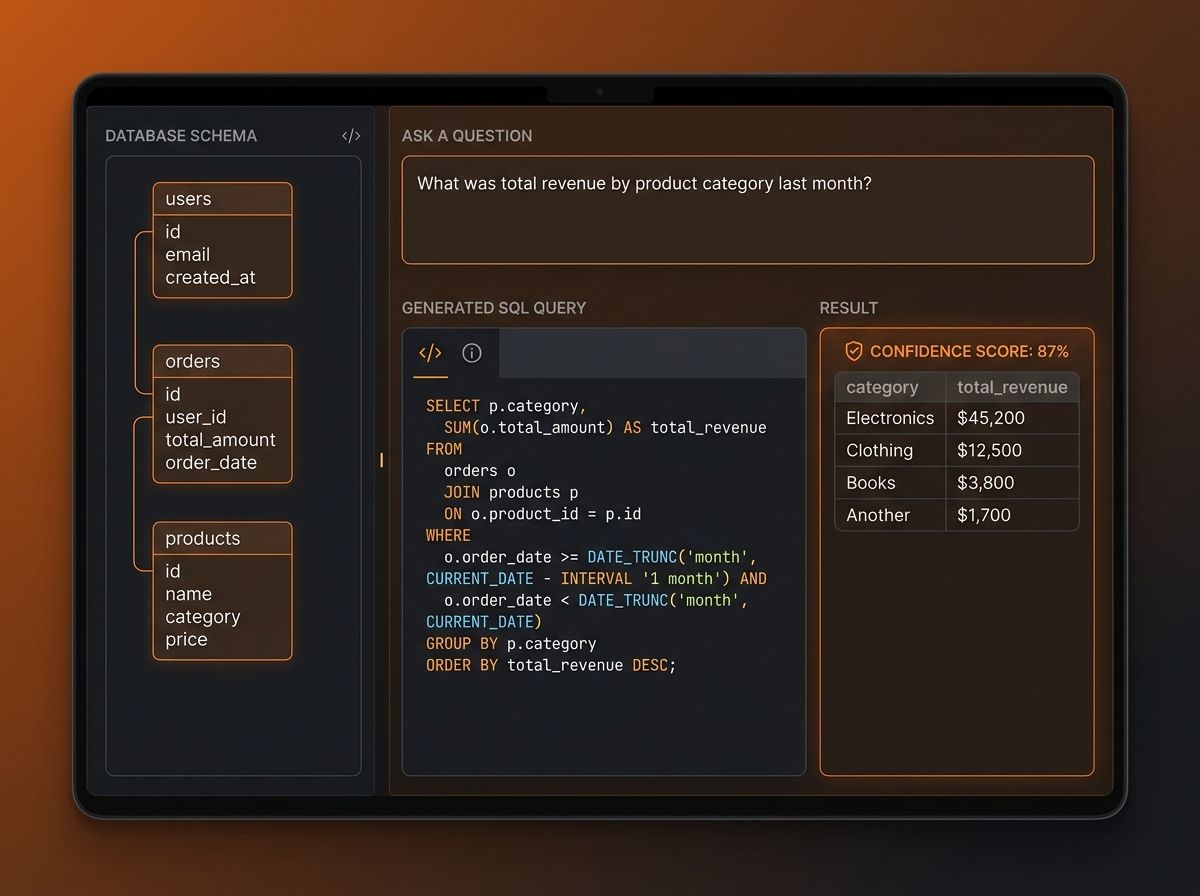
Where Vanna is weak: the SQL it generates is only as good as the schema it has. For a poorly documented database, Vanna will produce queries that miss the right tables or get the joins wrong. The other soft spot is the "last mile" — for complex multi-step analyses (where the question needs to be broken into 3-4 SQL queries), Vanna handles the first one well but the orchestration across queries is manual. For pure SQL generation, Vanna is the right tool; for the entire analytical workflow, you may need to add additional layers.
Pick Vanna if you need to query a SQL database in natural language, you want a tool that improves over time as you approve generated queries, and you have the data infrastructure to support the training workflow. Skip it if your data is in documents (not databases), or you need a tool that handles the full analytical workflow end-to-end.
NotebookLM: the AI research notebook
NotebookLM is Google's AI research notebook, and the pitch is "upload your sources, ask questions, get answers with citations." The tool ingests PDFs, Google Docs, websites, and pasted text, then lets you query the corpus in natural language. Every answer includes citations to the exact passage in the source document, which is the killer feature for any research or analysis workflow.
The standout feature is the citation accuracy. NotebookLM does not hallucinate URLs or invent facts — every claim in the answer is linked to a specific passage in one of your uploaded sources. For a researcher doing a literature review, this is the feature that makes the tool trustworthy. The other under-appreciated feature is the Audio Overview, which generates a podcast-style conversation between two AI hosts about your sources. For consuming long documents on the go, this is the most novel feature in the AI research space.
The pricing is generous. NotebookLM is free for individual use, with the NotebookLM Plus tier at $20/month for higher limits (500 sources, 500 chat queries per day). For a researcher or analyst, the free tier is enough for most projects; the Plus tier is the right answer for high-volume work.
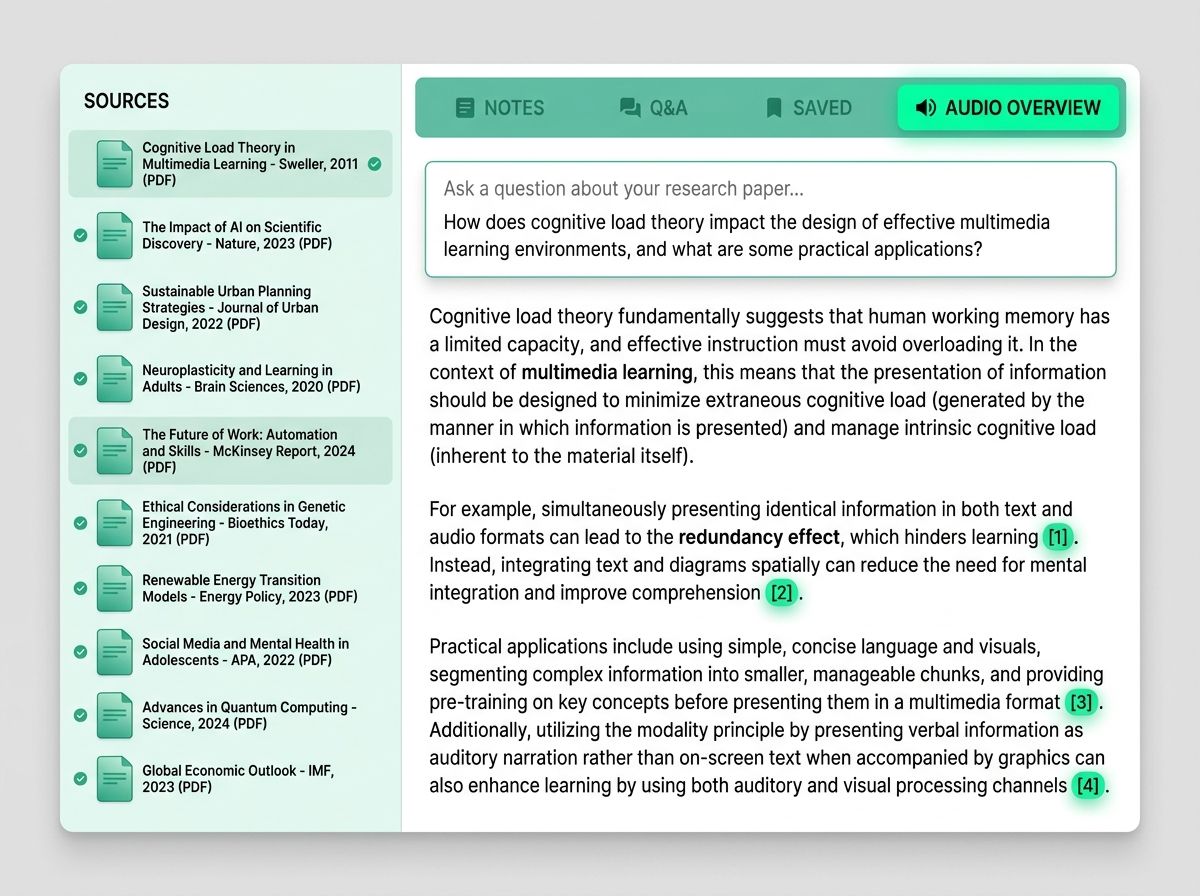
Where NotebookLM is weak: the analysis is bounded by the documents you upload. If a question is not answered in the sources, the model will tell you it does not know — it will not pull from the open web or from general knowledge. The other soft spot is the multi-document synthesis — for questions that span 10+ documents, the answer can feel surface-level compared to a researcher who has read everything carefully. For deep cross-document analysis, you may need to do multiple rounds of queries.
Pick NotebookLM if you need to extract insights from a corpus of documents, you value the citation accuracy, and the Audio Overview is useful for your workflow. Skip it if your data is in a SQL database, or you need analysis that pulls from sources you have not uploaded.
How Vanna and NotebookLM compose
The two tools are not direct competitors — they cover different parts of the data workflow. The most common combined use case is: use NotebookLM to extract the analytical question from a corpus of documents (research papers, internal reports, customer feedback), then use Vanna to query the structured database for the answer. The researcher reads the papers to understand the question, then asks the database for the data.
The inverse is also common: use Vanna to identify interesting patterns in a database, then use NotebookLM to research the context (what does the literature say about this pattern?). The data analyst finds a spike in churn, then asks the research corpus what the literature says about churn patterns in this segment.
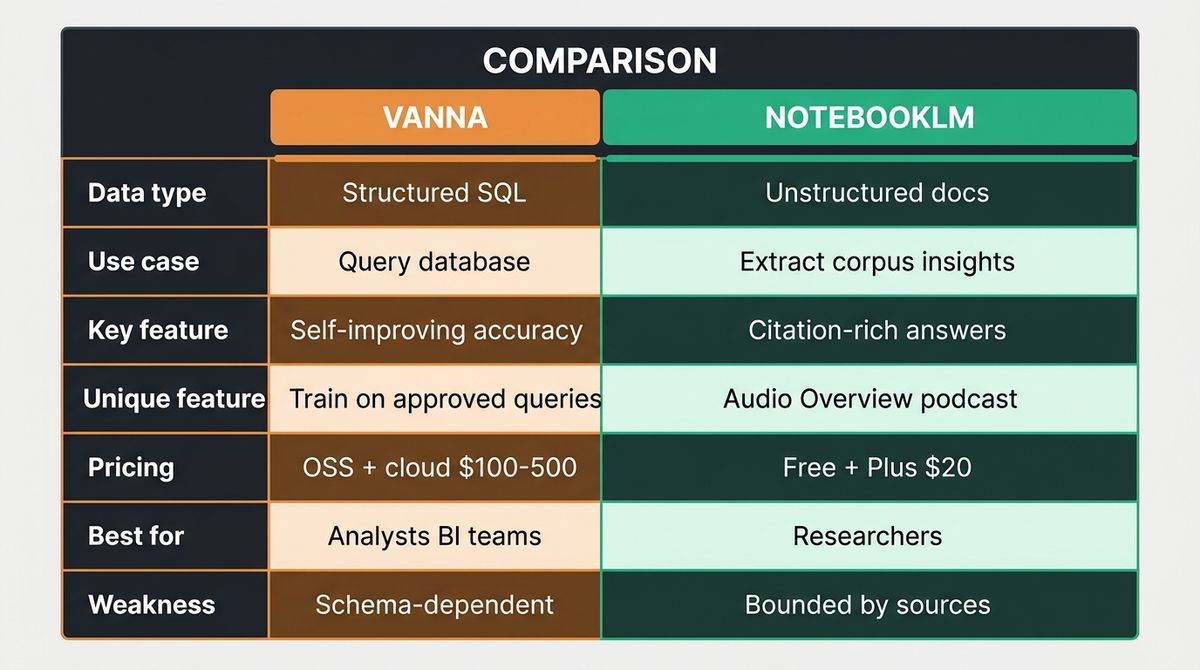
| Vanna | NotebookLM | |
|---|---|---|
| Data type | Structured (SQL database) | Unstructured (documents) |
| Use case | Query database in English | Extract insights from corpus |
| Key feature | Self-improving accuracy | Citation-rich answers |
| Unique feature | Train on approved queries | Audio Overview (podcast) |
| Pricing | Open-source + cloud $100-500/mo | Free + Plus $20/mo |
| Best for | Analysts, BI teams | Researchers, content analysts |
| Weakness | Schema-dependent | Bounded by uploaded sources |
Verdict by use case
If your data is in a SQL database: Vanna. The natural language to SQL workflow, the self-improving accuracy, and the open-source availability make it the right answer.
If your data is in documents (PDFs, notes, papers): NotebookLM. The citation accuracy, the Audio Overview, and the generous free tier make it the right answer.
If you have both: use both. NotebookLM for the document research, Vanna for the database queries. The two compose well — most analytical workflows need both.
If you are a researcher doing a literature review: NotebookLM. The citation accuracy is the killer feature for academic work. The Audio Overview is useful for getting familiar with a new corpus quickly.
If you are a data analyst querying a production database: Vanna. The self-improving accuracy and the natural language interface make it the right answer for repeated analytical queries.
For most serious analytical work, you end up using both. Vanna for the structured data, NotebookLM for the unstructured data. The tools are not competitors — they cover different parts of the analytical workflow.
What to try first
If you've never used an AI data tool, start with NotebookLM — the free tier is enough to feel the category. Upload 5-10 documents on a topic you care about, ask 5 questions, see how the citation-rich answers compare to your own reading. Once you've felt the workflow, add Vanna when you need to query a database. The free/open-source tier of Vanna is enough to evaluate.
Bottom line
Vanna and NotebookLM cover different shapes of data. Vanna is for structured data (SQL databases). NotebookLM is for unstructured data (documents). The two are not direct competitors; they cover different parts of the analytical workflow. For most serious analytical work, you end up using both — Vanna for the numbers, NotebookLM for the context. Pick the one that matches your data, and add the other when you need to cover the other half of the workflow.
See the full profiles — and 59 other AI agents — in our directory.